The packaging says Matter. The IKEA website says Matter. All the marketing: Matter.
And yet there’s Zigbee inside. Complete, functional, usable – and IKEA doesn’t say a word about it.
A button for five euros
In late 2025, IKEA added two new remotes to their lineup under the Bilresa name. The E2489 with two buttons – up and down – and the E2490 with a scroll wheel and an additional button. Both cost around five euros. Both run on two AAA batteries. And both say: Matter.
Matter over Thread, to be precise. Which means: without a Thread Border Router – like an Apple TV, a HomePod mini, or the ZBT-2 for Home Assistant – nothing works out of the box.
Or does it?
Zigbee and Thread share the same radio standard – IEEE 802.15.4 at 2.4 GHz. A single chip can do both; it’s just a matter of firmware. IKEA chose to market Thread externally. But for backward compatibility with older IKEA bulbs via Touchlink, the Zigbee stack in the chip is still fully present. And that’s exactly what we can use.
What this means – and why it’s worth it
For anyone already running a Zigbee network, this is pretty good news. Because the Bilresa costs a fraction of what comparable Zigbee buttons typically cost.
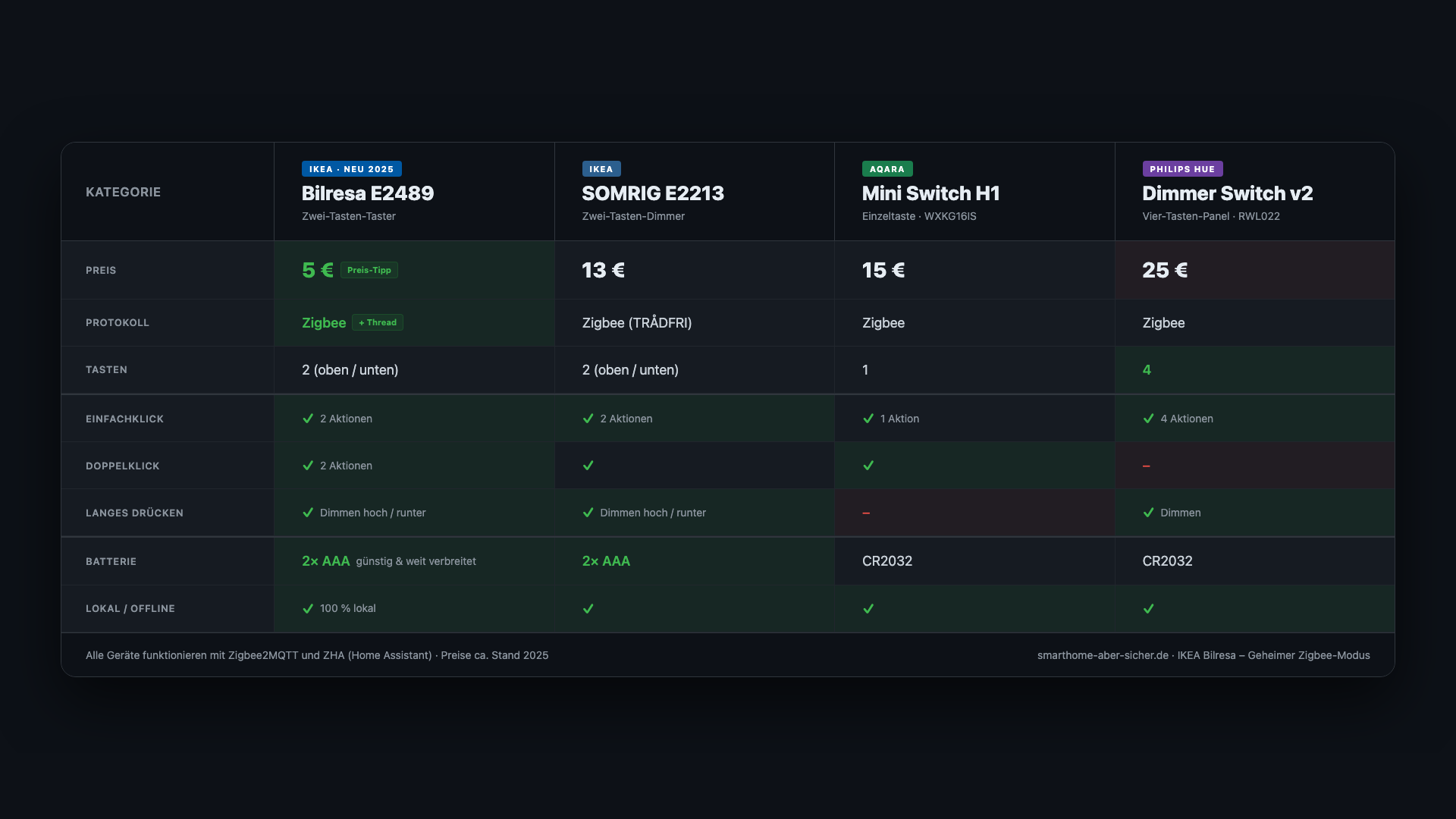
The Bilresa holds its own: two buttons, single click, double click and long press per button – that’s six different actions you can freely assign in Home Assistant. AAA batteries instead of CR2032. And of course: no IKEA account, no cloud, everything local.
The only thing you need is a Zigbee coordinator – which you most likely already have.
The honest warning first
I’ll say this before anyone ends up disappointed: Zigbee mode is not officially supported by IKEA. It exists as a side effect of Touchlink backward compatibility – not as an intentional feature.
What that means in practice: while the button is paired in your Zigbee network, it receives no firmware updates from IKEA. Those only come via the Matter/Thread path. That doesn’t happen by accident – and if you ever re-pair the button via Matter and install an update in the process, the Zigbee mode could disappear.
In Zigbee operation itself: no risk. And for five euros, that’s a reasonable trade-off.
Pairing: the button sequence IKEA doesn’t document
The pairing is the trickiest part of the whole thing. It’s not intuitive, and if you don’t know the steps, you won’t figure it out on your own.
In brief:
- Factory Reset: Remove the cover, hold the pairing button for about 10 seconds until the LED pulses amber. Don’t let go too early.
- Touchlink mode: Press the pairing button 4 times quickly in a row. The LED flashes amber rapidly.
- Enable Permit Join in Zigbee2MQTT or ZHA.
- Zigbee mode: Press the pairing button 8 times quickly in a row. The LEDs go completely dark – that’s correct. No visual confirmation.
Your coordinator will now find the button. In Zigbee2MQTT it appears as BILRESA remote control with buttons.
Speed matters. No long pauses between presses, otherwise the button won’t recognize the sequence. If it doesn’t work the first time: just start over. The video shows the entire process live, including the stumbling blocks I ran into myself.
Six actions, one decision
What arrives in Zigbee2MQTT after pairing is clean: the E2489 sends single click, double click and long press for each of the two buttons. Six different events you can freely link to automations in Home Assistant.
One small thing to know in advance: the button waits about one second before sending a single-click event – it needs to check whether a second click follows. That’s by design and can’t be changed. For turning lights on/off, that’s perfectly fine. For time-sensitive use cases like alarms, you should be aware of it.
For automations in Home Assistant, there are two approaches: with the experimental_event_entities setting enabled in Zigbee2MQTT, each button gets an action entity you can use to build automations with normal state selection. Alternatively – and without that setting – a direct MQTT topic trigger works just as well. Both approaches are explained in the video.
Zigbee or Matter – which is right for when?
If you’re wondering whether to go the official Matter route instead, here’s a direct comparison:
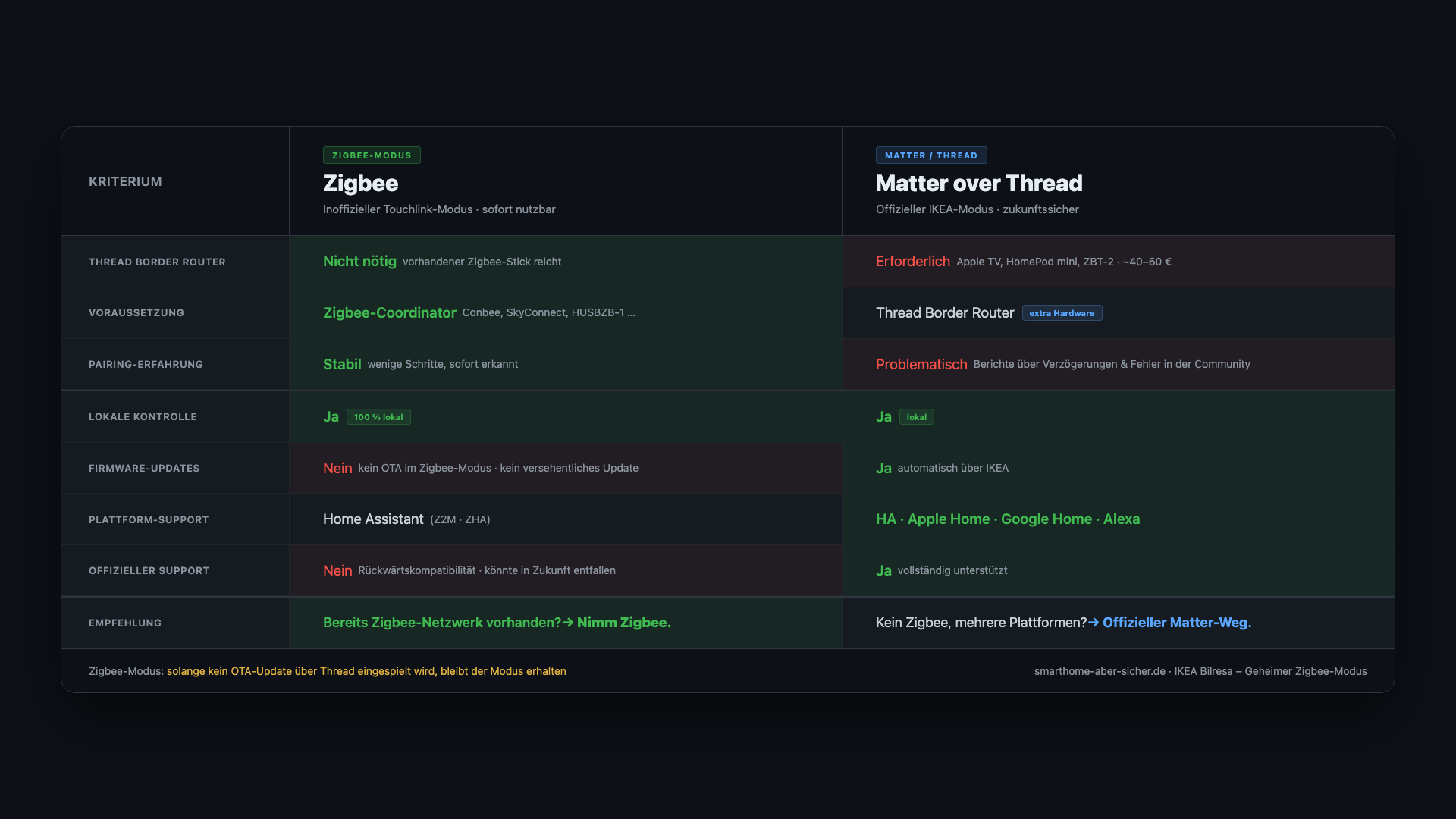
My take: if you already have a running Zigbee network and the button is only going to work in Home Assistant – go with Zigbee. Faster, more reliable, no additional gateway needed. If you’re committed to Matter long-term or running multiple platforms in parallel, the official route is the better choice.
Links from the video
- IKEA Bilresa E2489 (Dual-Button) in the IKEA shop
- Zigbee2MQTT documentation E2489
- Zigbee2MQTT documentation E2490 (Scroll-Wheel)
If you’d like to support via Amazon: using this link earns me a small commission – regardless of what you buy, the price stays the same for you. Thank you.