
I’m not someone who touches a home server when it’s running. My Raspberry Pi 4 had been rock-solid for years, handling Home Assistant, MQTT, InfluxDB and a handful of other services – and I was, honestly, content with it. Not excited, but content.
Then an email arrived from IceWhale.
A board I hadn’t ordered
The pitch came in late March, and unlike most collaboration requests that get my channel name wrong or offer razors to a smart home channel, this one was targeted: You’re running a local stack with Home Assistant and MQTT – want to try it on a ZimaBoard 2?
I was skeptical. Not about the board – about myself. Someone who hasn’t fundamentally touched their Pi stack in years doesn’t just adopt a new platform on a whim. It’s work. It’s risk. And in the worst case, the smart home is down for days.
Then I looked at the specs. Then I ran the benchmarks. And then the decision had basically already made itself.
The old setup – what was actually running
For years, this was my home server foundation: a Raspberry Pi 4 with 8 GB RAM, Debian on top, and a whole zoo of Docker containers on top of that. Home Assistant, Mosquitto, InfluxDB, Grafana, Paperless-ngx, Zigbee2MQTT, Pihole, DiyHue – all on a single board. For storage, a SATA SSD was attached via a USB adapter, because SD cards for a 24/7 system had felt too risky for a long time.
The whole thing sat in a 3D-printed case with a 12 cm fan on top. I was genuinely proud of that case back then. It did its job. Quiet too.
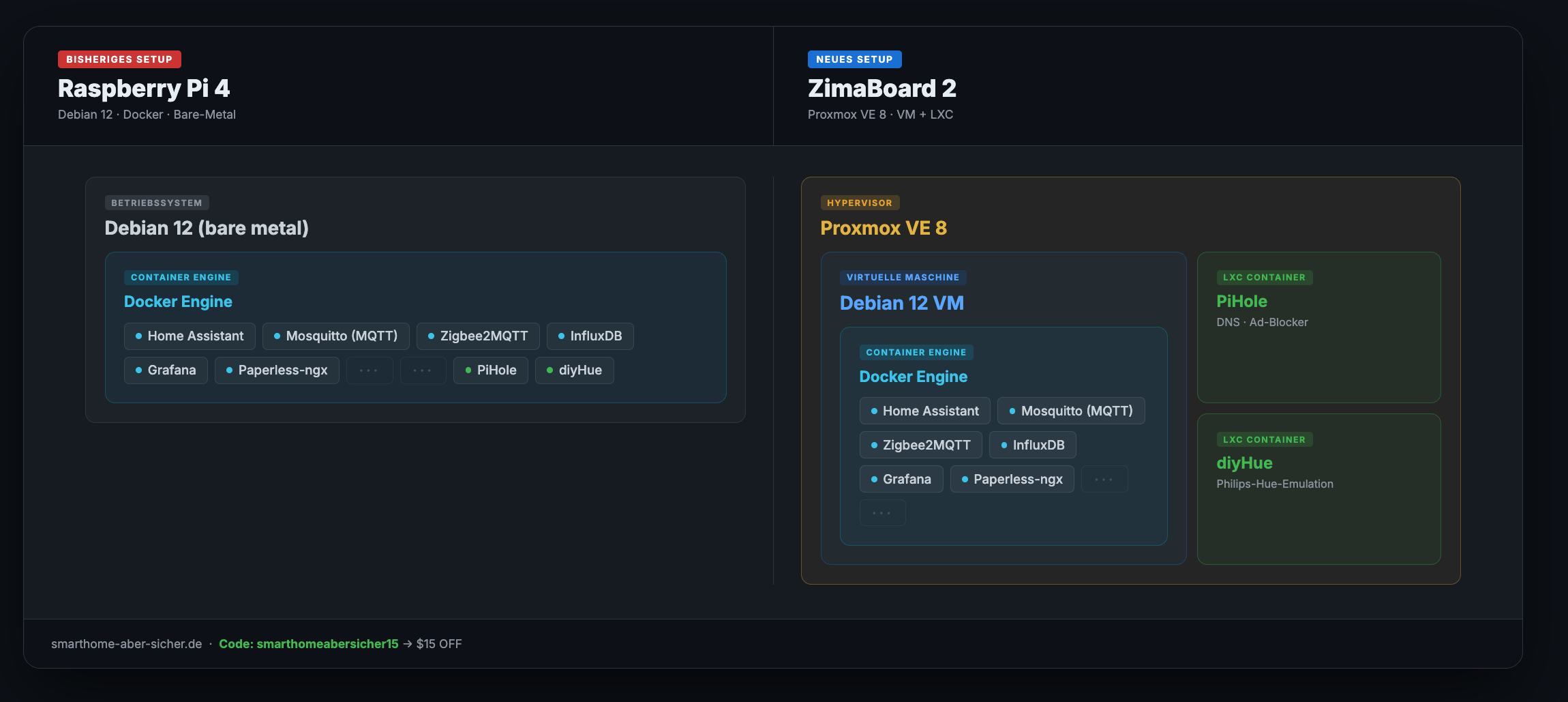
That was my stack – the old Pi setup on the left, what runs now on the right. The video explains the difference better than any description, but the most important change at a glance: instead of everything flat in Docker, the ZimaBoard now runs Proxmox, with a Debian VM for the Docker stack underneath, and two lean LXC containers for Pihole and DiyHue. Cleaner, more flexible, and services no longer step on each other.
Why the Pi wasn’t actually ideal
Here’s what surprised me most – not the new features of the ZimaBoard, but what I’d forgotten about my old setup.
The biggest weak point was storage access. Attaching an SSD via USB sounds harmless, but it costs you: every write operation goes through the USB controller, the CPU has to assist, and peak latency under load hit 196 ms. Those are the small stutters you sometimes feel in Home Assistant – loading the interface, saving an automation, writing to InfluxDB. You get used to it. You start thinking it’s normal.
It isn’t.
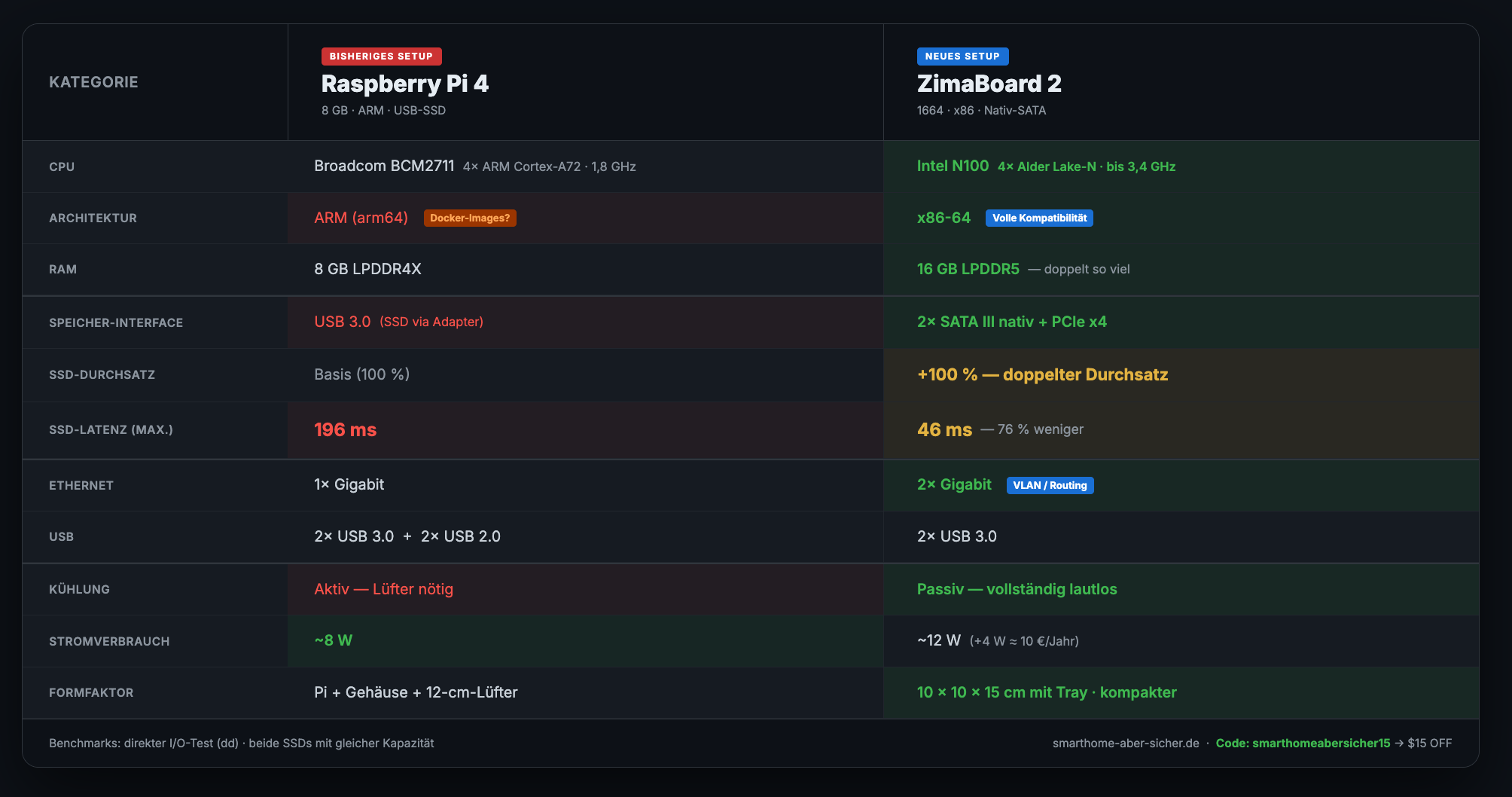
The ZimaBoard has a native SATA connection – no USB detour, no controller overhead. Peak latency in the same test: 46 ms. Double the throughput, 76% less latency, and the Intel N100 barely breaks a sweat.
Power draw increases slightly: from around 8 watts to 12 watts. Four watts more, roughly €10 per year. I think that’s a fair trade.
What’s in the video
The full migration – including the snags I ran into along the way – is in the video. I show:
- What migrating a running Docker stack to a new platform actually looks like in practice
- Why Proxmox as a hypervisor makes more sense for a home server than bare Debian
- How to pass a Zigbee USB stick through to a Proxmox VM
- What I’d do differently next time – and there is something
And at the end I ask a question where I genuinely need your input. The context explains itself in the video.
Try the board yourself
If you want to test the ZimaBoard 2 yourself: IceWhale set up a discount code for my channel. With smarthomeabersicher15 you save $15 in their shop. I get a small commission, you don’t pay more.
👉 ZimaBoard 2 in the IceWhale Shop (affiliate link)
👉 2-Bay HDD Rack Tray for ZimaBoard 2 (affiliate link)
This video was made in collaboration with IceWhale – the board was provided to me at no cost. The technical assessment and everything I say is my own opinion.
Note: Links marked with affiliate link are affiliate links. As a partner of various retailers and manufacturers (e.g. Amazon, OBI via the Awin network, Shelly) I earn from qualifying purchases. This means I receive a small commission if you purchase through these links — at no extra cost to you. The revenue helps me run this blog and YouTube channel and keep creating content. Thank you for your support!
― Joachim