A Cloudflare Tunnel is encrypted, but without access control anyone can open it. How to properly secure Home Assistant from the outside.
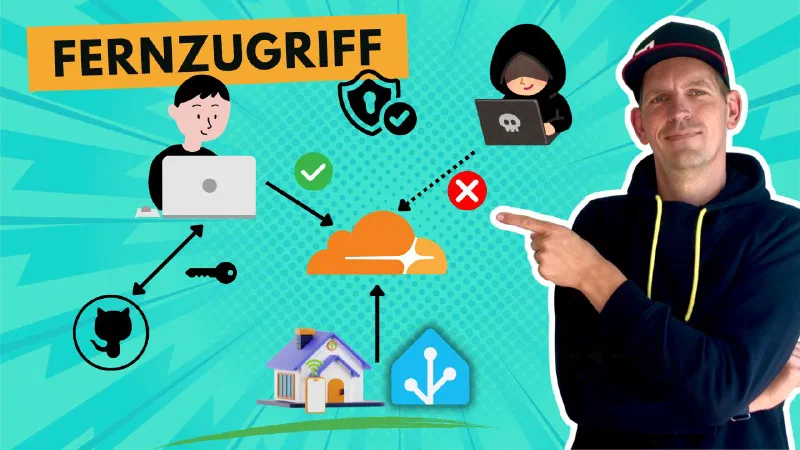
Many people set up a Cloudflare Tunnel, see that Home Assistant is reachable from anywhere — and stop right there. The problem: the tunnel is encrypted, but anyone can access it. No login, no access control, nothing. It’s like locking your apartment door while the building’s front door is wide open.
I’ll show you how to do this properly: set up the tunnel, secure access — and at the end, make an honest assessment of what you’re trusting Cloudflare with.
To load the video, please click the image. Please note that by doing so, data will be transmitted to YouTube.
The False Sense of Security Through HTTPS
Many people think: “If I use HTTPS, I’m safe.” But that’s a misconception. SSL encrypts the connection — it does not prevent your Home Assistant from being visible and vulnerable on the internet. That’s exactly what happens when you only set up a tunnel and do nothing else.
Today we go one crucial step further: Cloudflare Tunnel plus access control. If you’ve already set up the tunnel, you can skip ahead to the next section.
Info: The hands-on step-by-step walkthrough is in the video above. You’ll need your own domain to follow along. If you don’t have one yet, I recommend Netcup based in Karlsruhe:
Netcup is a German hosting provider I’ve been a customer of since 2011 — now with nine products (domains, web hosting, vServers and root servers). I’ve been consistently satisfied over all those years. I particularly want to highlight the reliable infrastructure, excellent support, and transparent pricing.
A real standout feature: special offers at Netcup are often permanent. That sets Netcup clearly apart from other providers where the price typically rises after the first year.
I also have vouchers for new customers for various Netcup products. Just reach out — I’m happy to help!
Thank you for your support! It helps me keep creating content for you.
― Joachim
The Weak Spot in Many Cloudflare Setups
Your smart home is now reachable from the internet — and many people stop there, satisfied. But there is one critical problem with this setup: while the tunnel connection is encrypted, anyone can access it.
It’s like locking your apartment door while the front door of the building stands wide open. Today we do better and add an additional layer of protection.
Info: The hands-on step-by-step walkthrough is in the video above.
How Trustworthy Is Cloudflare?
So now, to stay with the analogy, the front door is also securely locked and only someone with keys to both doors can get through. Right? Unfortunately, no. Because there’s one player you may not have on your radar — and that’s Cloudflare itself.
We’ve set up two layers of protection: the authentication in Home Assistant and Cloudflare Access. For a hacker to access your smart home now, they’d need to successfully bypass both security mechanisms — Cloudflare’s and Home Assistant’s. The odds of that are orders of magnitude lower than if the system were just sitting open on the internet. Sounds like a perfect setup? Almost — because there’s one small but important catch.
Cloudflare itself has unencrypted access to everything passing through the connection in this setup. And Cloudflare is a US company, which means it is not subject to the strict data protection regulations that apply here in Europe. You therefore have to place a certain degree of trust in the company behind Cloudflare. If that makes you uncomfortable — what are the alternatives? You could set up your own VPN access with WireGuard or Tailscale — technically a bit more demanding, but privacy-friendly. Or you use Home Assistant Cloud — it’s a paid service, but offers a straightforward and secure solution with considerably more concrete privacy rules than Cloudflare. However, you still have to extend some trust here too, because Nabu Casa — the company behind Home Assistant Cloud — is also a US company and is not bound by EU rules. That said, they do advertise that they don’t log user activity or analyze it for advertising purposes. That may matter to some of you.
My Take
If you use Cloudflare correctly — with Tunnel and Access — you have a free, highly secure solution for remote access to Home Assistant, without opening a single port.
Cloudflare is, however, a US company with unencrypted access to your connection. If that’s not acceptable to you, consider WireGuard, Tailscale, or Home Assistant Cloud instead. More on those coming soon here on “Smart Home? But Secure!”