
Ad: This video is sponsored by PCBWay, PCBWay paid me for it. I bought the Echo Dot myself. Links marked (paid link) are affiliate links.
This Echo Dot is used, bought on a German classifieds site for just under 30 euros. It looks the same as always, but Amazon is gone: it now talks to my Home Assistant. Getting there was a rocky road, but in the end it worked. Except now it listens to everything but me.
Here’s what you need to know if you want to try this yourself, and which pitfalls I can save you from.

The video is in German, English subtitles are available.
Three ways to a voice satellite
If you want to control Home Assistant by voice, you need a device in the room that listens and answers: a voice satellite. There are three ways to get one.
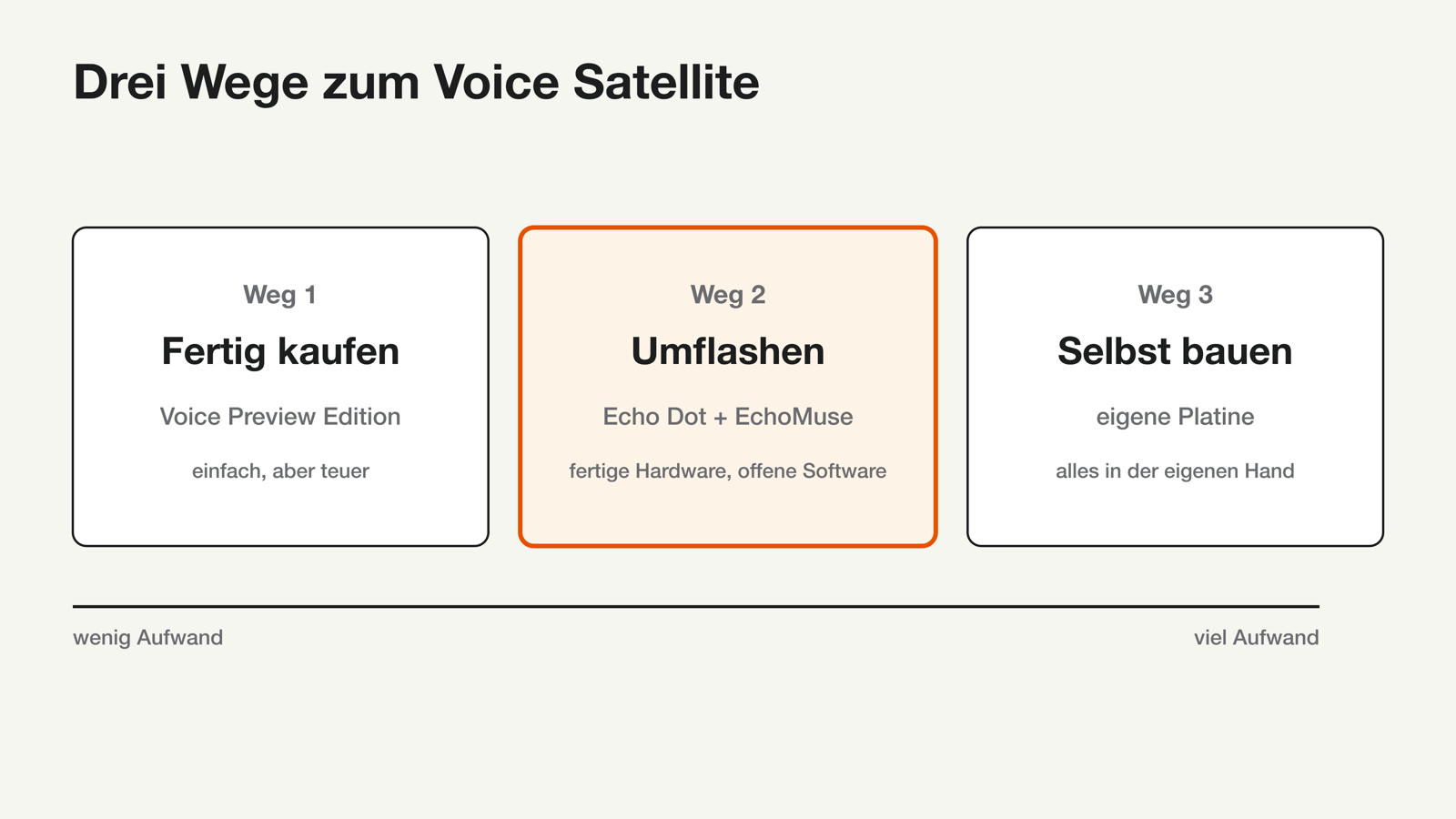
- Buy one ready-made, for example the Home Assistant Voice Preview Edition. The easiest, but probably also the most expensive way.
- Reflash: ready-made hardware, open software. That’s what I did with the Echo Dot.
- Build your own with a custom board. More on that below.
Way two: the Echo Dot with EchoMuse
The project is called EchoMuse (open source, MIT license). It turns the second-generation Echo Dot (2016) into a satellite that Home Assistant adds like an ESPHome device. The Dot can then do voice, music and timers, and works as a Bluetooth proxy on the side. Right now only this one generation is supported, ports for other Echo models are in progress.
Including buyer protection and shipping, my Dot cost 27.62 euros. Before the conversion I tested it once with Alexa to make sure the microphones and speaker work.
The conversion at a glance
I filmed the whole process, the video only shows the time-lapse. You may know the principle from Android phones that get a custom ROM. But Amazon offers no official way to unlock the device, so the tool exploits a security hole in the built-in MediaTek chip (MT8163) that kicks in at the very start of the boot process, before Amazon’s software runs.
There are two steps:
- Unlock once over USB with amonet-biscuit. I used a Linux laptop (Ubuntu 24.04, x86) because the reports from Linux users were the most promising. According to the guide it also works on Windows, and for the Mac there’s firebreak. I haven’t tried that.
- Install the firmware: an assistant in the browser installs the new software via WebUSB, and a small controller runs on your server, as a Home Assistant add-on or Docker container.
The steps are well described in the EchoMuse quickstart. Cameron Gray’s video is a good introduction too.
This is not something for an evening without prior knowledge. It got stuck in several places for me, and if something goes wrong, the Dot can become unusable. Only do this with a device you can afford to lose.
My pitfalls
- amonet-biscuit version: v1.1.0 stays on FireOS 5, v2.0.0 brings FireOS 6. At the time, EchoMuse was tested with FireOS 5.5.5.4, so I went with v1.1.0. My Dot previously ran Alexa on FireOS 6.5.7.0, and the unlock still worked. The firebreak README does recommend not setting up the Dot in the Alexa app before unlocking, because it may update itself to an unsupported build.
- Secure Boot on Linux: After an Ubuntu upgrade without a reboot, the
cdc_acmdriver was rejected (“Key was rejected”) and the script couldn’t find the Dot. A reboot fixed it. - “Remove the short and press Enter” always appears, even without shorting the test point. Just press Enter.
- TWRP times out: After a while the Dot tries to boot FireOS again and the ring stays solid blue. With v1.1.0 you don’t get back into TWRP with Vol+ (that only applies from v2.0.0), but with
bash boot-recovery.shand then plugging the Dot in without pressing a button. - WebUSB only on localhost or HTTPS: Chrome only allows WebUSB on secure pages. If the controller runs on a different machine, an SSH tunnel helps, for example
ssh -N -L 8768:localhost:8768 pi@server, then openhttp://localhost:8768. - Assistant stuck at step 4: After replugging, the Dot rebooted into Android. The USB cable is also the power supply. With v1.1.0, holding the mute button while plugging in gets you into TWRP.
In the end the Dot showed up as the “Wohnzimmer” (living room) satellite in Home Assistant, with firmware 2.17.0 and emOS 0.10. It detects the wake word directly on the device.
Way three: build your own with Onju Voice
Ad, PCBWay
If that’s too much hassle, or you’d rather have everything in your own hands, build your own satellite. My favorite example is Onju Voice: a custom board with an ESP32-S3 that replaces the original board in a Google Nest Mini. The housing stays, the electronics are new. With ESPHome firmware it runs directly as a voice satellite in Home Assistant. The hardware isn’t brand new anymore, and its successor Onju Voice v2 is aimed more at AI agents than at Home Assistant.
You don’t have to etch or assemble boards like this yourself. You can have Onju Voice manufactured directly by PCBWay, the sponsor of this video: Onju Voice on PCBWay with Gerber files and BOM, and there’s also an ESPHome rebuild. PCBWay is my go-to source for circuit boards and assembly, and they also do CNC and 3D-printed parts. The board for my range hood came from there, and an assembled board for my next project is in production right now. More on that in December.
🛒 Circuit boards from 5 pieces, assembly from 1 piece depending on the board: https://abersicher.link/pcbway (paid link)
By the way, Onju Voice won first prize in PCBWay’s 6th Project Design Contest. If you have a project idea yourself: the ninth round of the contest runs until January 24, 2027.
Two voice pipelines tested
How well the Dot understands depends on what runs behind it in Home Assistant. I tested two setups. All my tests were in German.
Setup 1: fully local
Speech recognition with Speech-to-Phrase, voice output with Piper, both as Wyoming services next to Home Assistant. Speech-to-Phrase is fast but only understands sentences from a fixed list, generated from the names in Home Assistant. Say anything else and the ring blinks green briefly, and that’s it. Or it guesses the closest sentence.
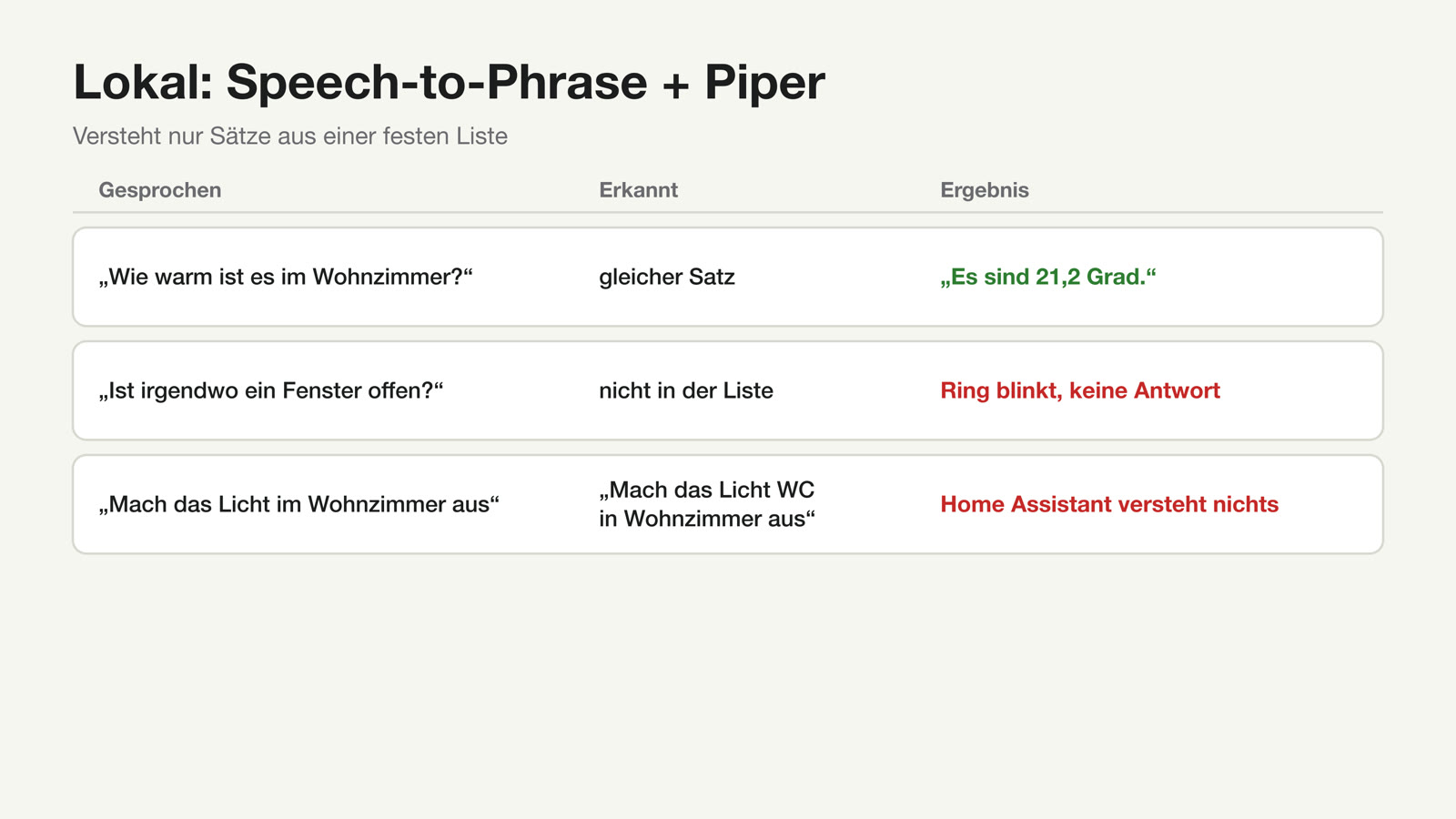
The chart is in German: “How warm is it in the living room?” works (“It’s 21.2 degrees”), “Is a window open anywhere?” gets no answer, and “Turn off the light in the living room” became “Turn off the light WC in the living room”, which Home Assistant couldn’t handle. If text is recognized but Home Assistant can’t match it, you at least hear “I didn’t understand”. If no text is recognized at all, EchoMuse only shows the ring cue, no announcement.
First, rename your smart home
To make this work at all, I had to rename half my smart home. Nobody says “shelly1-light-hall”. 27 devices got new names, and I hid 95 entities from the assistant, leaving 190 of 264 exposed entities.
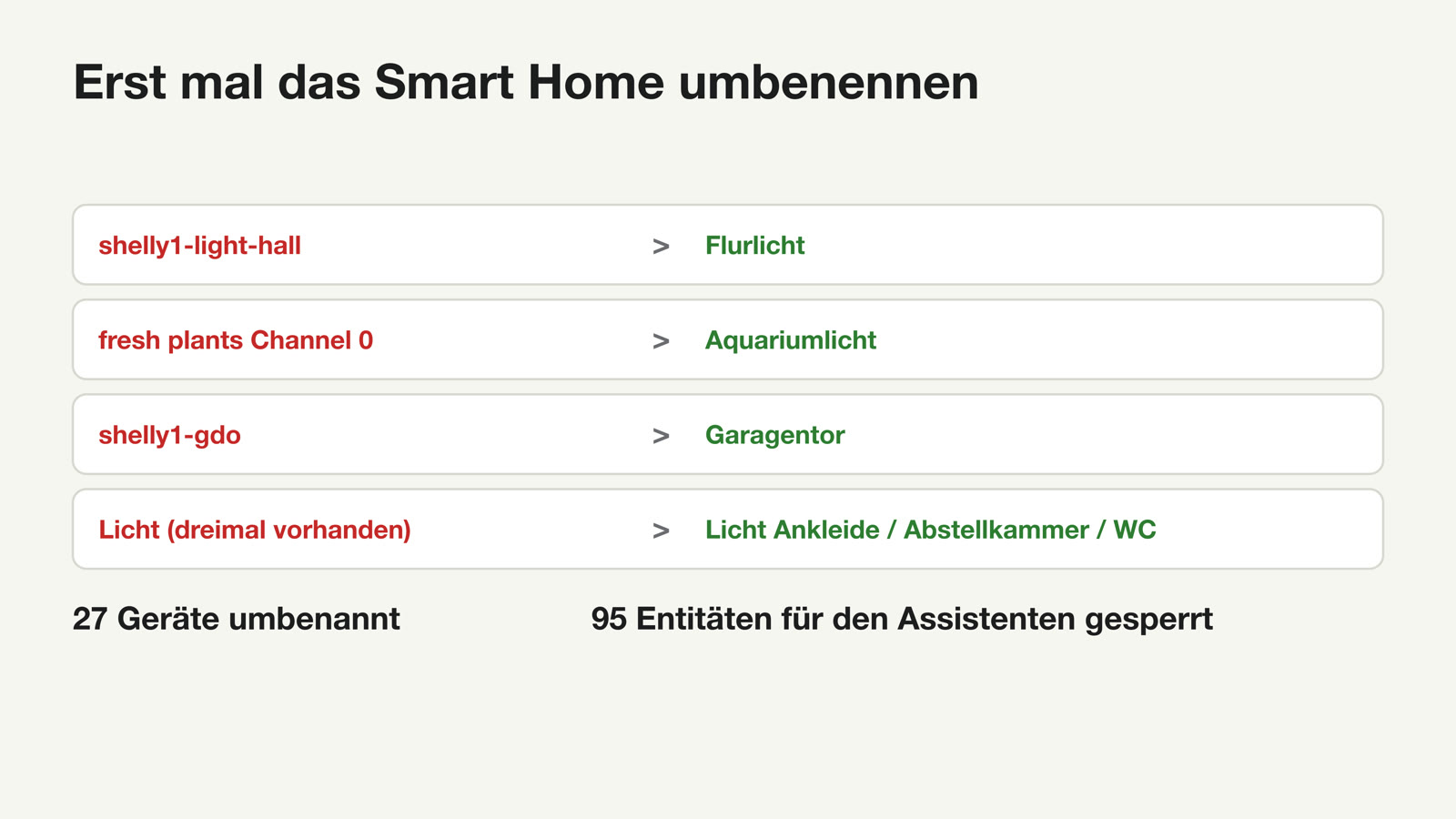
What else I changed:
- Moved devices to the right area, for example the kitchen island and counter from the living room to the kitchen.
- Resolved duplicate names: three relays were simply called “Licht” (light).
- A custom response template for temperatures, “Es sind 19,3 Grad.” instead of “19.3 °C”. Otherwise Piper reads “nineteen point three C”.
- Switched the Piper voice from “thorsten” to “pavoque”.
This helped both setups: voice control is only as good as the names in your smart home.
Setup 2: Groq in the cloud
The second setup uses Groq, with a Q. It’s an AI provider, not to be confused with Grok, the chatbot from xAI. There, Whisper turns speech into text. Home Assistant first tries to understand the sentence itself (“prefer handling commands locally”), and if that fails, a language model steps in.
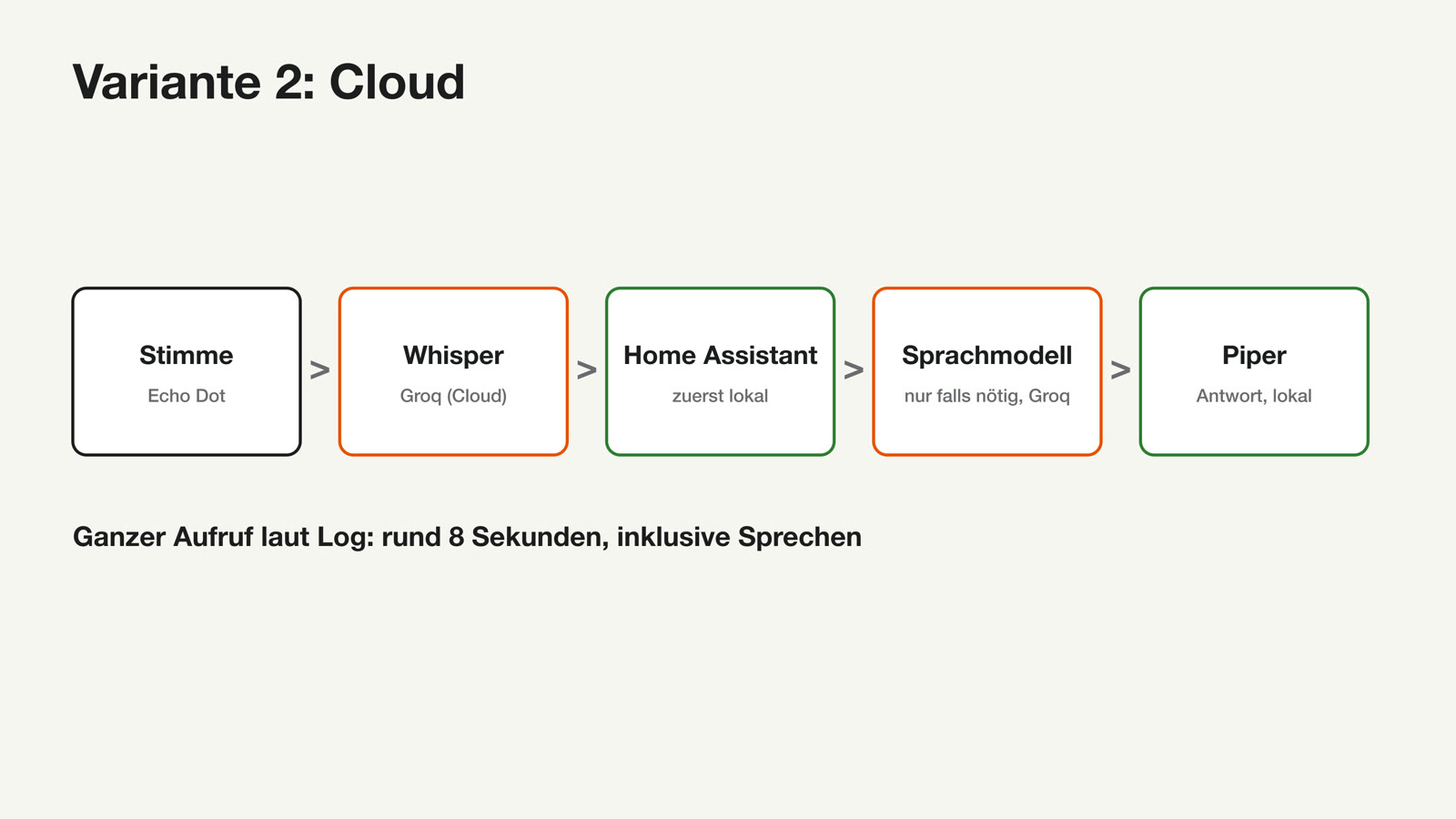
My configuration:
- Speech recognition: Groq Whisper large-v3 via the
wyoming_openaiproxy - Language model: Extended OpenAI Conversation (HACS) with base URL
https://api.groq.com/openai/v1and modelopenai/gpt-oss-120b - Voice output: still Piper, locally
Without tuning, this went wrong: the default prompt with all 335 entities blew through Groq’s free quota, and the English error message was read aloud for 17 seconds. With a short German prompt and a compact device list, the language model answers in under a second. According to the log, the whole request from speaking to answer took around eight seconds in both setups.
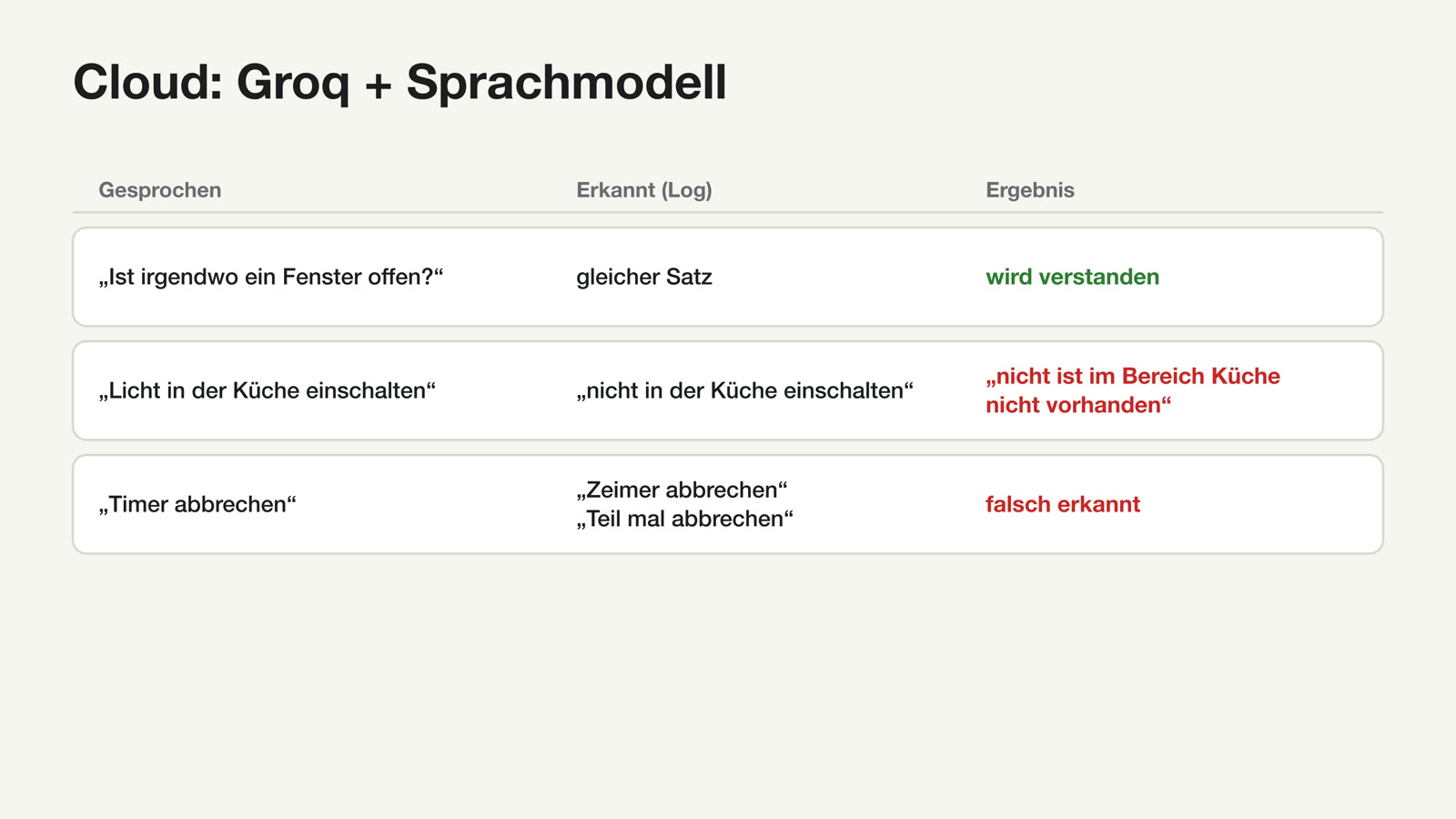
This lets me phrase things more freely. In return, my voice goes to the internet again, which is exactly what I wanted to get rid of. And this setup isn’t error-free either: “Licht in der Küche einschalten” (turn on the kitchen light) became “nicht in der Küche einschalten”, and “Timer abbrechen” (cancel timer) turned into “Zeimer abbrechen”.
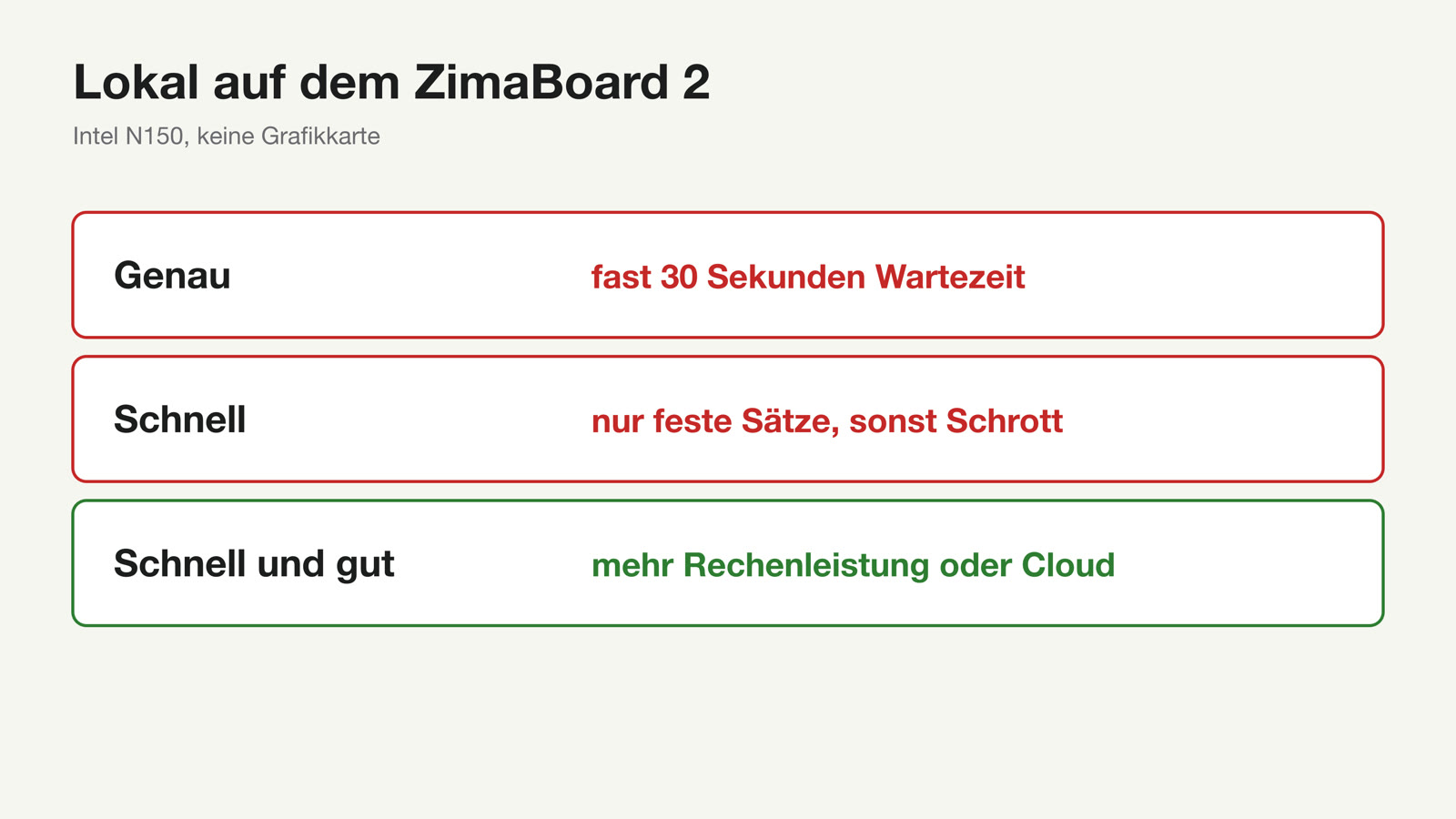
You can also host Whisper yourself. But on my ZimaBoard 2, the answer then took almost 30 seconds. That would need much stronger hardware.
The Dot itself is frugal: the wake word runs on the device, and on the server Speech-to-Phrase needs about 260 MB of RAM, the Groq proxy about 50 MB and the EchoMuse controller about 140 MB.
Wake word “Alexa”
A little joke on the side: you can set the wake word to “Alexa”. It then keeps answering to that name, only Amazon isn’t listening anymore. According to the docs, this only works if there are no real Alexas left in the house. Other options are “Hey Jarvis”, “Hey Mycroft” and “Hey Rhasspy”. You can train your own wake words with oww_forge from the EchoMuse repository, but that needs a lot of disk space and a full night on a CPU. I found no German models in the community collection.
Verdict: not quite happy yet
The wake word fails in both directions. In the evening while watching TV, the Dot suddenly starts talking, parrots the sound from the TV and adds: “I don’t understand.” The log then says something like: “Our astrometric sensors were specially designed for this ship.” And in a quiet room I stand two meters away and have to say “Hey Jarvis” three times.
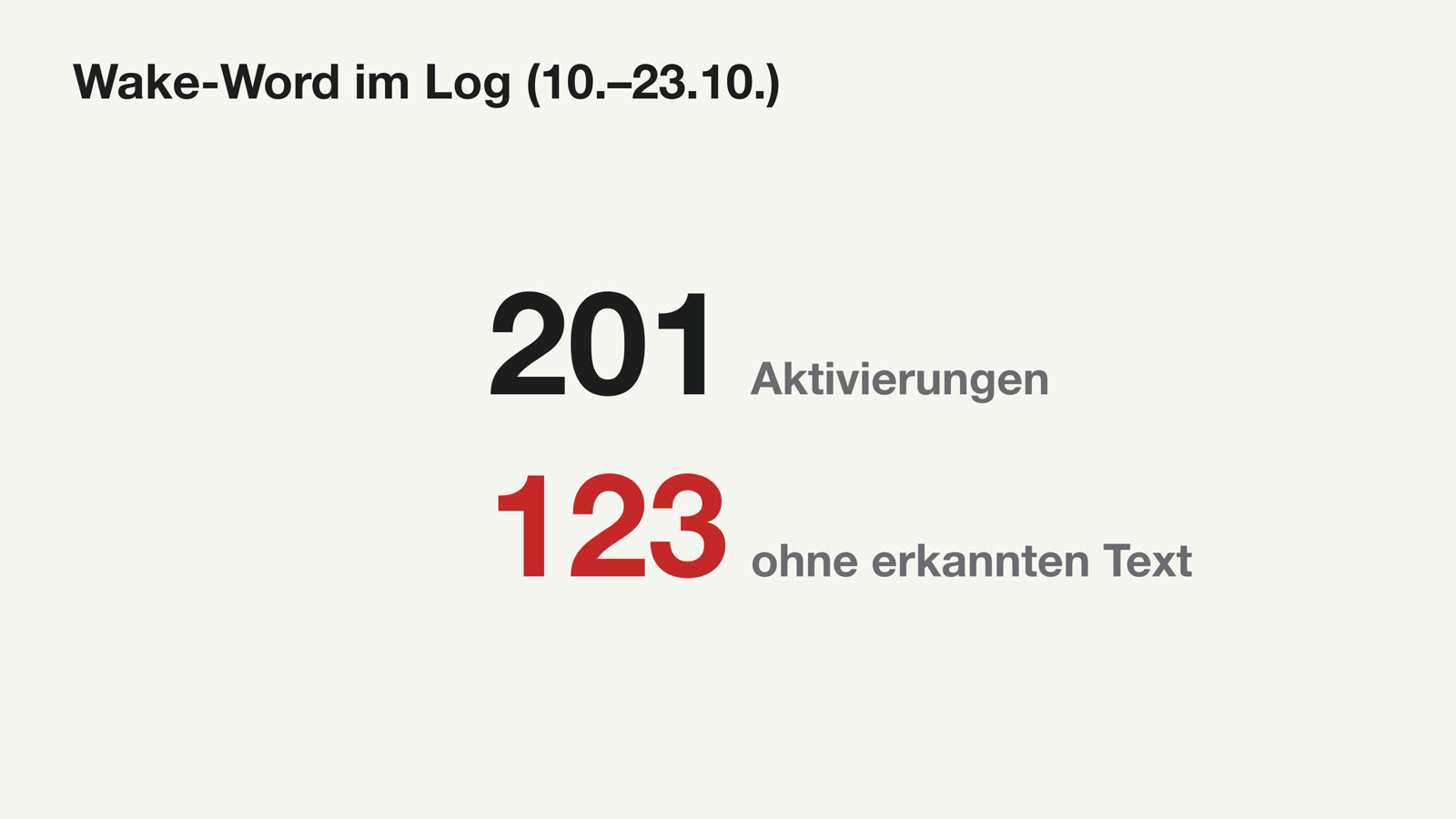
Of 201 wake word activations between October 10 and 23, 123 ended without any recognized text. And when it listens by accident, in the cloud setup the conversation in the room ends up at Groq too.
Local speech recognition needs more computing power. My Home Assistant runs on a ZimaBoard 2 with an Intel N150, a frugal mini server without a graphics card. That’s plenty for Home Assistant, but not for good speech recognition: either accurate and slow (almost 30 seconds), or fast and only fixed sentences.
On top of that, a few basic points:
- The mute button on the Dot 2 is software only, the microphones aren’t really disconnected.
- The ring doesn’t show a running timer, it only rings and pulses when the timer is up.
- Without a working Home Assistant, the Dot does nothing at all.
Still, I like the approach: old hardware reused. For 27 euros it was a good experiment. As a permanent solution I’m not convinced yet, at least not without a server upgrade.
How would you continue? Keep optimizing the Dot, buy one ready-made, or order something from PCBWay? And if you already use a voice satellite: which one, and how happy are you with it? Let me know in the comments under the video.
Links
- EchoMuse: https://github.com/wilbowes/EchoMuse
- Unlock guide amonet-biscuit (XDA): https://xdaforums.com/t/unlock-root-twrp-unbrick-amazon-echo-dot-2nd-gen-2016-biscuit.4761416/
- firebreak (unlock on macOS): https://github.com/bboe/firebreak
- Cameron Gray’s video: https://youtu.be/eJ2OxFRJRLk
- Onju Voice on PCBWay: https://www.pcbway.com/project/shareproject/Onju_Voice_d33625a1.html
- ESPHome firmware for Onju Voice: https://github.com/Idskov/onju-voice-esphome
- Onju Voice v2: https://github.com/justLV/onju-v2
- PCBWay 9th Project Design Contest: https://www.pcbway.com/activity/9th-project-design-contest.html