
Advertising: EVOline provided the PowerOrganiser and the Qi charger free of charge; there was no fee. Links to Shelly are affiliate links. Content and opinions are my own.
Charging cables for the tablet, the smartwatch and the smartphone – stretched right across the kitchen table. That’s how it looked at my place for a long time, until I couldn’t stand it anymore. So I built a smart charging drawer. And it does more than charge: it knows what’s inside, whether the phone is done, and it warns me before I leave the house without my phone. The interesting part: my iPhone never tells the drawer that it’s done. The drawer knows anyway.

The base: EVOline PowerOrganiser
You may already know the drawer from my Short, where I installed EVOline’s PowerOrganiser. The box contains three parts:
- the drawer insert with matching compartments, including a tray for the phone,
- the EVOline One socket,
- and the Wing – the real trick.
The problem with a socket in a drawer isn’t the socket, it’s the cable leading to it. The drawer slides in and out, and the cable has to follow every time without kinking, catching or getting pinched at the back of the cabinet. The Wing is a kind of accordion: it’s screwed to the side wall of the base cabinet with a small bracket, unfolds when you open the drawer and folds up compactly when you close it. The drawer still closes flush, and from the outside you can’t see a thing.
Setup: Qi charger and Shelly 2PM Gen4
Today I’m going two steps further:
- Inductive charging: a Qi charger from EVOline with a magnetic snap-in function. Put the phone on it, done. The Apple Watch holds on nicely too, by the way.
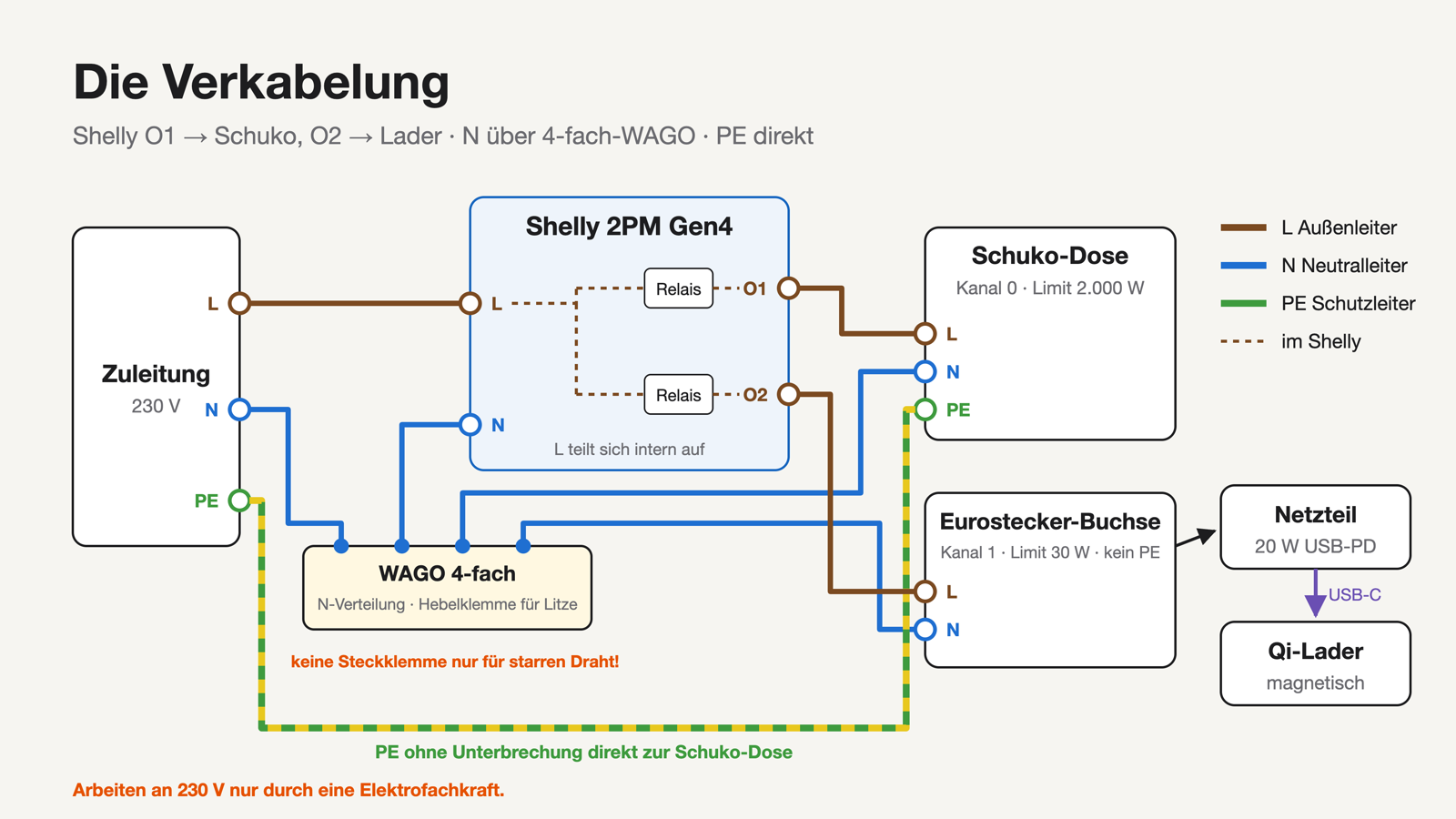
- Measuring and switching: the whole drawer is connected to a Shelly 2PM Gen4.
Next to the EVOline socket, the drawer holds a 20 W USB-PD power supply that feeds the Qi charger. The free socket takes the tablet charger or simply a kitchen appliance when needed.
The Shelly has two channels that I can switch and measure separately:
| Channel | Load | Power limit in the Shelly |
|---|---|---|
| Charging channel | Power supply + Qi charger | 30 W |
| Socket | Schuko socket (tablet, kitchen machine) | 2000 W |
The readings go straight to Home Assistant – locally, without cloud and without an extra app.
Where to put the Qi pad? 3D printing instead of hot glue
How to mount the Qi pad turned out to be trickier than expected. Double-sided tape from below: held less than 30 seconds. Hot glue: a bit better, but not permanent – and the pad gets warm.
The solution came from EVOline itself: the socket sits in a 3D-printed insert with side spacers. Push it into the bottom left corner of the drawer, two screws in, and it sits in exactly the right spot. I borrowed that idea for the Qi charger and designed a holder in FreeCAD:
- a tube with the pad resting on a narrow ring on top,
- the center stays open, ventilation slots on the sides let the heat escape,
- a cutout guides the cable out sideways without lifting the pad,
- two flat bars run to the left and front drawer walls.
Drop it in, push it into the corner, two screws – the pad always sits right under the phone tray of the drawer insert. I printed it in PETG, which handles heat much better than PLA.
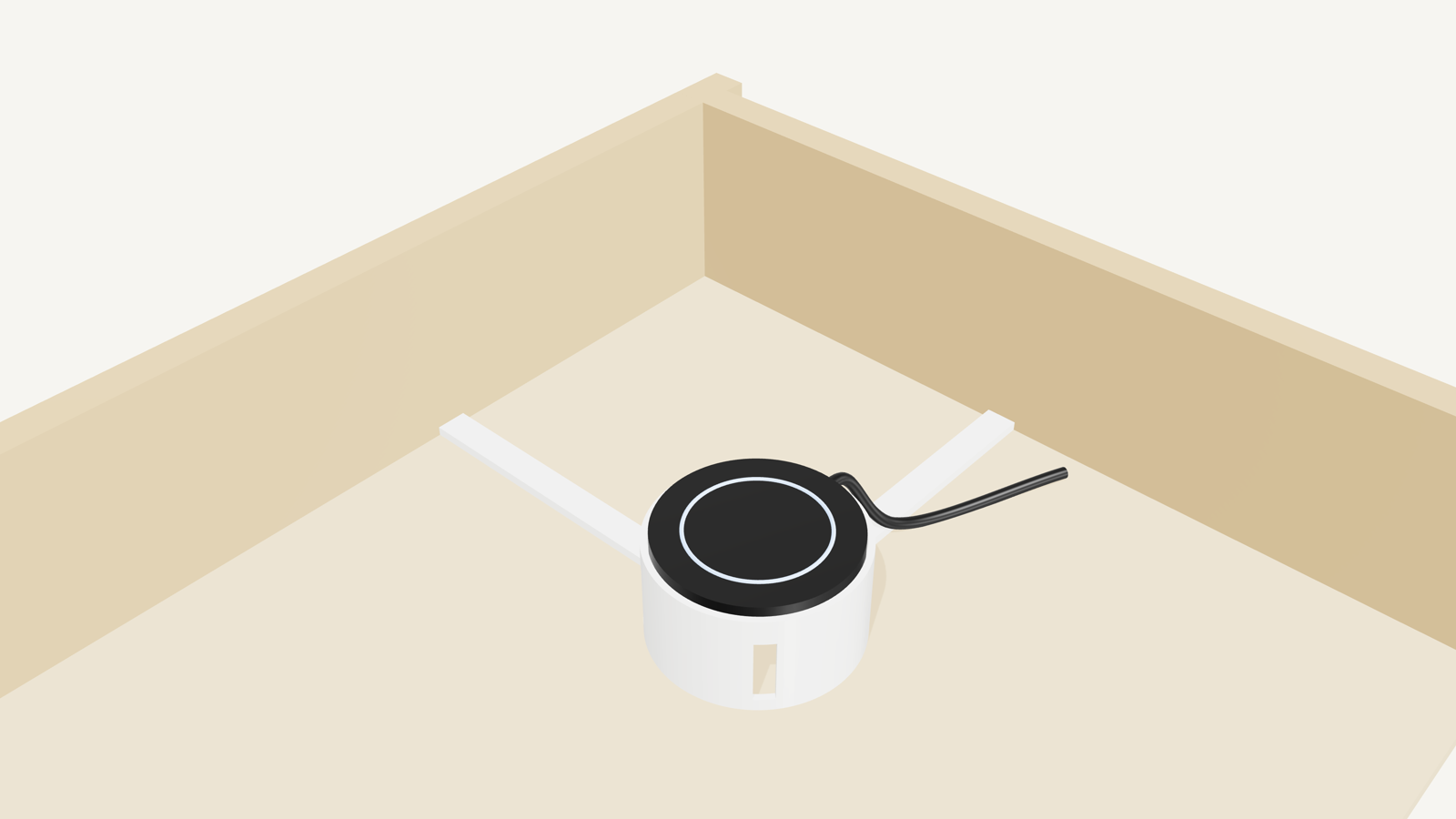
Download: the model (FreeCAD, parametric via a “Params” spreadsheet) is on GitHub: github.com/jowi24/qi-pad-halter (CC BY-NC 4.0).
Safety first: 230 V in a wooden box
The drawer contains 230 volts, a power supply and a charging coil. All three get warm, and a drawer is a closed wooden box. So two things matter:
1. Proper installation. The PowerOrganiser is made for exactly this, with touch protection and strain relief. One detail that often goes wrong: for the neutral wire you need a WAGO terminal approved for stranded wire. Simple push-in terminals are only made for solid wire and don’t hold stranded wire securely. If in doubt, bring in a qualified electrician.
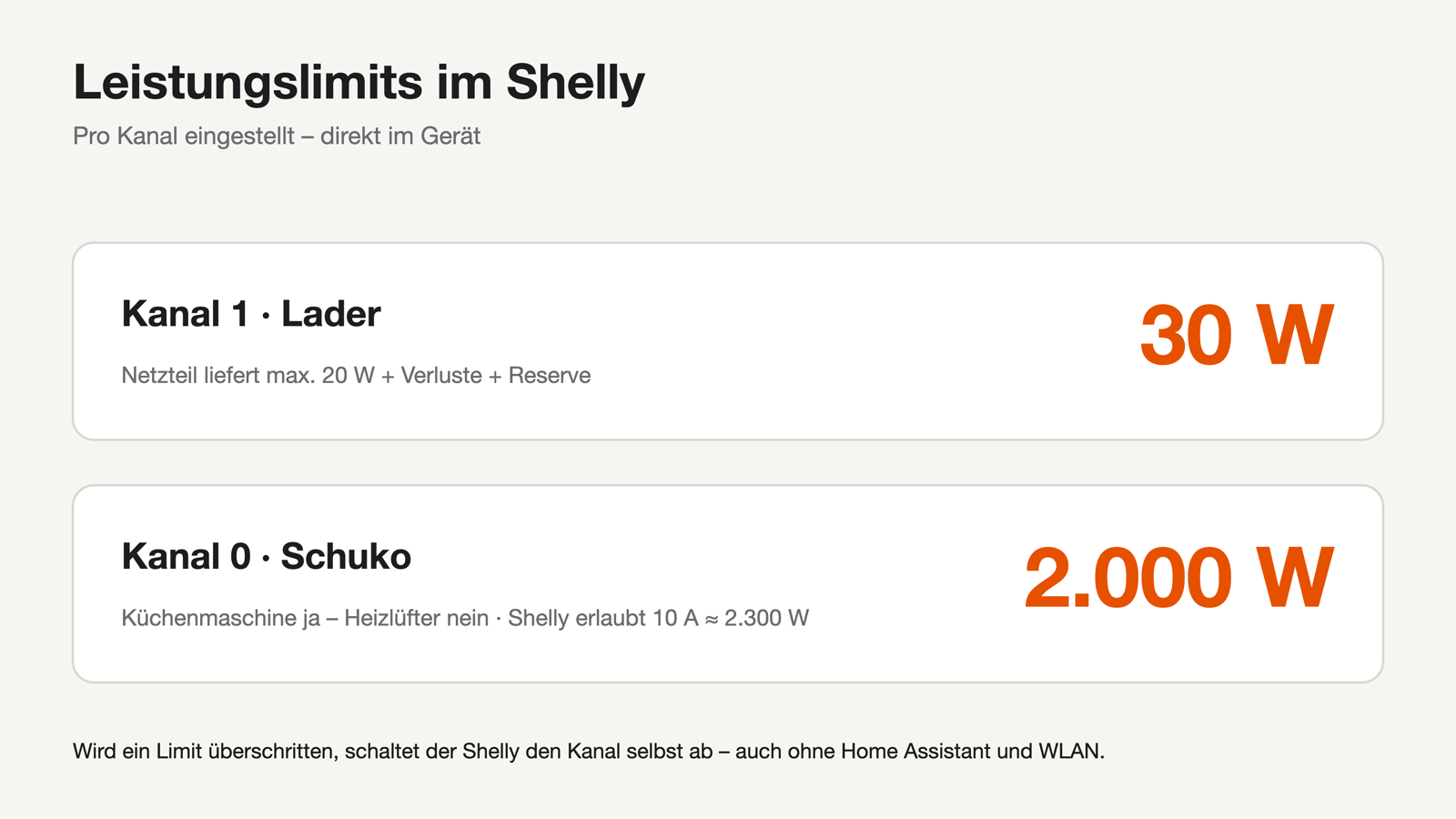
2. The Shelly keeps watch. It has built-in protection against overheating, overload, overcurrent and overvoltage and switches off by itself – right in the device, even if Home Assistant or the Wi-Fi are down. On top of that, I set power limits:
- Charging channel: 30 W. The power supply delivers 20 W at most. 20 W plus losses plus reserve – if the channel draws more, something’s wrong and the Shelly cuts the power.
- Socket: 2000 W. A kitchen machine might be plugged in there. The Shelly 2PM Gen4 is rated for 10 A, i.e. 2300 W per channel – plenty of buffer.
What the Shelly measures while charging
Some of the numbers surprised me:
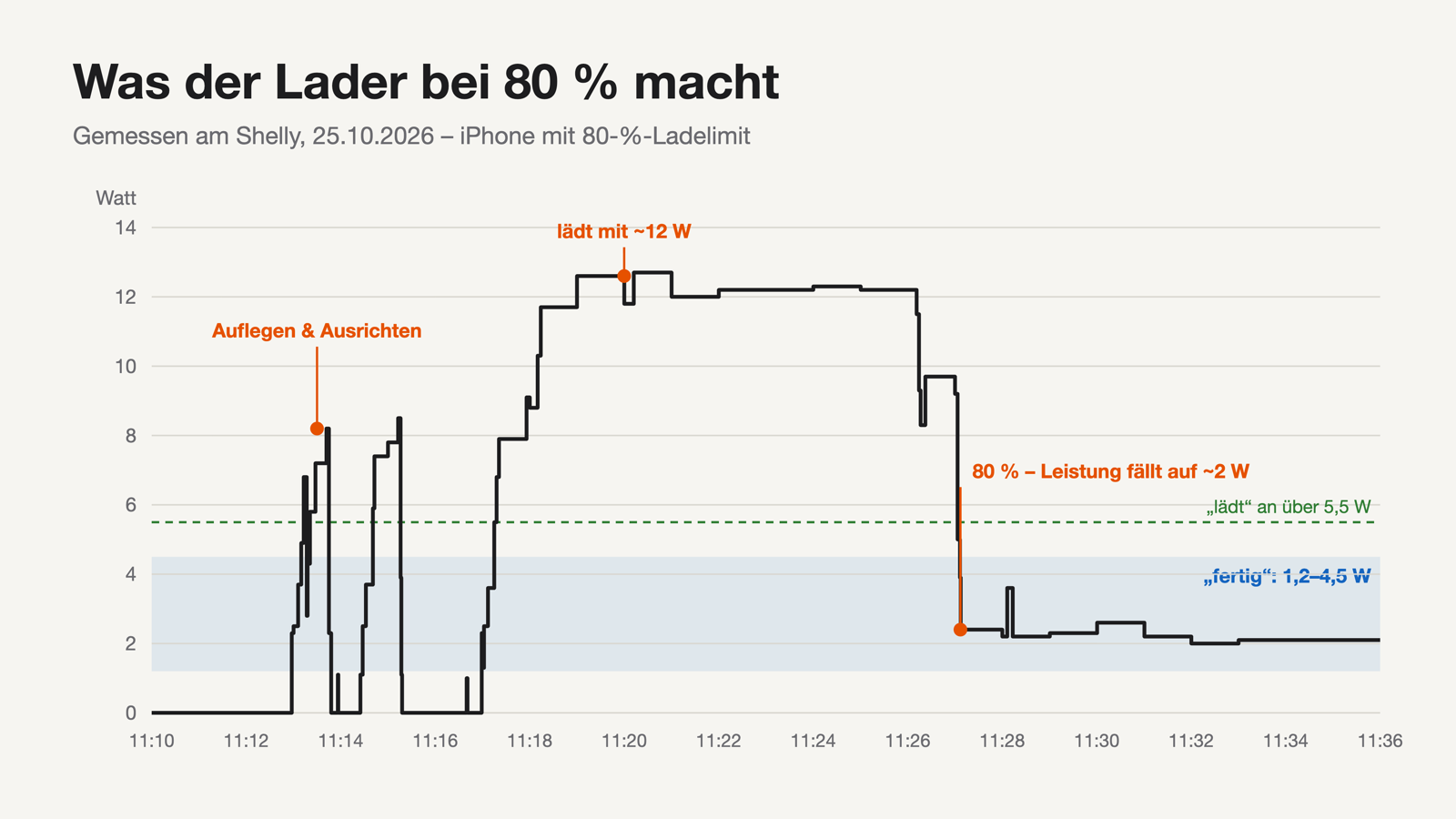
- Empty drawer: 0 W. Every now and then the charger searches for a device – short spikes of about 1 W for a second. So there’s no standby problem, and I skip a nightly switch-off automation; it simply wouldn’t save anything.
- iPhone on the pad: the charger ramps up within about a minute. With inductive charging, part of the energy is lost as heat in the power supply and the coil.
- iPhone full: within a minute the power drops to about 2 W – but not to 0. That’s going to matter.
The logic: Home Assistant helpers instead of YAML
The basic logic runs entirely on helpers in the UI:
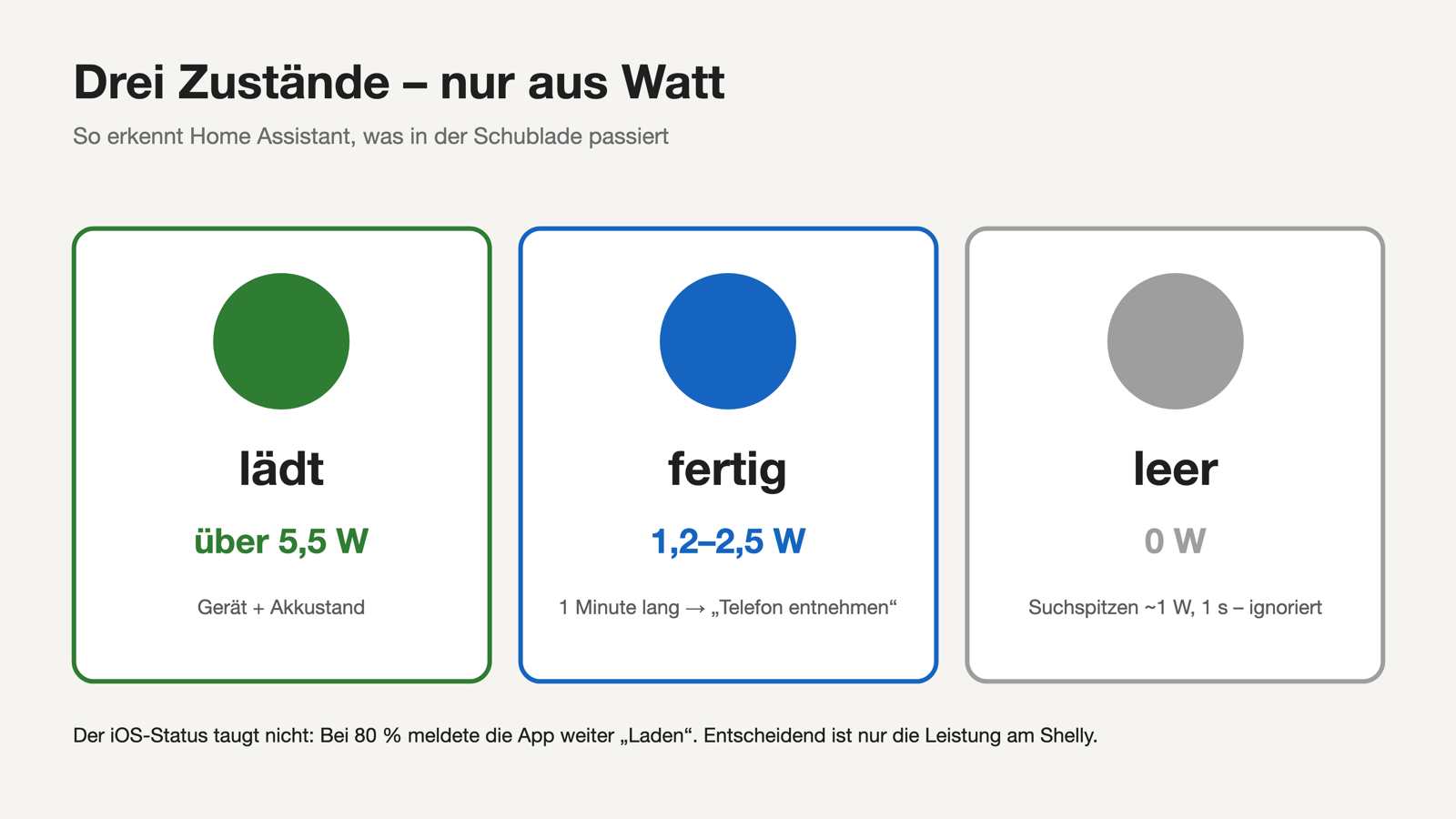
Helper 1 – threshold sensor “charging drawer charging”: on above 5.5 W, off below 2.5 W. The gap (hysteresis) is intentional; otherwise the sensor flickers when the power hovers around a value.
Helper 2 – what’s inside? The Home Assistant companion app on the iPhone reports battery level and charging state. If the drawer is charging and the iPhone says “I’m charging”, it’s most likely the iPhone in the drawer. That becomes, for example, “Jo’s iPhone” with its charge level. If something unknown is charging – a guest’s phone, say – it shows “unknown device”.
Tip: an iOS shortcut sends the current sensor values as soon as a charger is connected or disconnected. That way the dashboard updates within about a second instead of waiting for iOS to let the app send in the background.
The 80 percent trap
My iPhone only charges to 80 % to extend battery life. That means it never reports “full”. And the charging state from the app isn’t reliable either – at 80 % it still said “Charging”, because iOS doesn’t let the app update often enough.
The solution is again in the Shelly’s readings:
- charging: above 5 W
- done, still on the pad: about 1 to 2 W trickle power
- removed: 0 W
So: no longer charging, but still between 1.2 and 2.5 W for one minute – the phone is done. The minute filters out the short search spikes. The dashboard shows “Remove phone”; if you like, a voice assistant can announce it too.
The Apple Watch trap
Then the Apple Watch tricked me: while charging, it draws about as much as a fully charged iPhone. Sure enough, one evening the dashboard said “iPhone done” while only the watch was in the drawer.
The fix: Home Assistant remembers whether a phone was really charging before. “Done” only appears if the power first rose above 5.5 W and never dropped to 0 afterwards. If the power goes straight from 0 to a few watts, it’s a small device like the watch – and that gets its own state.
Dashboard and leaving-home warning
On the dashboard, all of this stays invisible as long as nothing happens. Only when the drawer is charging do the tiles appear in my notification section: which device, what percentage, how much power. If the tablet is charging at the front socket, it gets its own tile. And when the phone is done: “Remove phone”.
My favorite feature: I already have an automation that warns me when I leave the apartment with a window still open, and turns off the lights. It now also checks the drawer. If something is still charging, or a finished phone or the watch is lying in it, a speaker announcement reminds me – generated locally in Home Assistant with Piper.
Conclusion
The drawer ended the cable chaos on my table – that alone was worth it. For a few euros, the Shelly turns it into a drawer that really knows what’s going on, warns me before I leave without my phone and keeps an eye on safety. And as always with Shelly: everything local, no cloud, no extra app.
Parts list
- EVOline PowerOrganiser (EVOline One type 928, Wing, drawer insert)
- EVOline Qi charger (magnetic)
- EVOline 20 W USB-PD power supply
- Shelly 2PM Gen4 (affiliate link)
- WAGO terminals approved for stranded wire
- 3D-printed Qi pad holder in PETG: github.com/jowi24/qi-pad-halter
What else should go into the drawer? Let me know in the comments below the video.